
To become a live chat expert, combine fast and clear communication with careful listening, honest expectations, useful saved replies, smooth handoffs, complete resolutions, and well-timed recommendations. Chaty can help businesses place multiple communication channels in one website widget, with customization, triggers, and targeting options available through its setup workflow. ([chaty.app](https://chaty.app/help/getting-started/how-to-use-chaty/?utm_source=openai))
- Respond quickly, acknowledge delays, and set realistic expectations.
- Use saved replies to improve consistency, but personalize every conversation.
- Resolve the customer’s immediate need before making a relevant sales recommendation.
- Configure Chaty around the channels, pages, audiences, and hours your team can genuinely support.
Becoming a live chat expert means more than replying quickly. It means understanding the customer’s goal, communicating clearly, using the right tools, and resolving each conversation with as little friction as possible.
Live chat can support customers, generate leads, answer pre-purchase questions, and connect website visitors with the communication channels they already use. The best results come from combining a well-configured chat widget with thoughtful processes and consistent customer service skills.
In this guide, you’ll learn what live chat is, how businesses use it, how to set up a multi-channel chat experience with Chaty, and 10 practical live chat best practices that can help you become a more effective live chat agent.
What is live chat?
Live chat is a digital communication channel that allows website visitors to contact a business through a chat window, messaging platform, contact form, or another connected channel.
Some live chat tools keep the entire conversation inside a website. Others, including multi-channel tools such as Chaty, act as a central starting point for customer communication. A visitor opens the website widget, chooses a preferred channel, and is directed to the relevant destination, such as WhatsApp, Facebook Messenger, Instagram, email, phone, SMS, or a contact form.
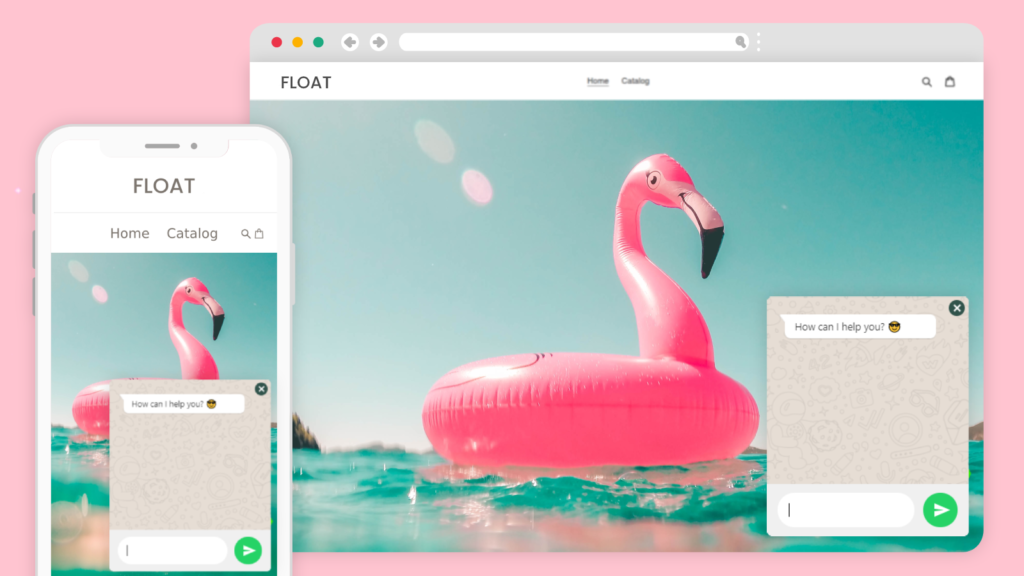
A live chat conversation may be started by the visitor or encouraged by a message that appears after a delay, scroll activity, or exit intent. The goal is not to interrupt every visitor. The goal is to make help easy to find when it is relevant.
What are the benefits of live chat?
A well-managed live chat channel gives customers a convenient way to ask questions and gives businesses another opportunity to provide support, build trust, and improve conversions.
- Faster access to help: Visitors can ask a question without searching for a phone number or opening a separate support portal.
- More convenient communication: Customers can choose a channel they already use, such as WhatsApp, Instagram, email, or phone.
- Better pre-purchase support: Agents can clarify product details, shipping information, pricing, or availability before a customer leaves the site.
- More efficient support: Agents can use saved replies, conversation context, internal collaboration, and routing processes to handle common requests consistently.
- More useful customer insights: Repeated questions can reveal gaps in product information, website navigation, onboarding, or self-service content.
- More opportunities to generate leads: A contact form or chat channel can capture questions from visitors who are not ready to call or complete a purchase.
Live chat is not automatically better than every other support channel. Some customers prefer phone or email, and complex issues may require a ticket, screen share, or scheduled call. The strongest customer service strategy gives people an appropriate choice and makes handoffs clear.
How businesses use live chat
1. Customer support
Customer support is the most familiar use of live chat. Visitors can ask for help with an order, account, product, appointment, subscription, or technical issue.
Useful support workflows include:
- Answering frequently asked questions with personalized saved replies.
- Collecting the information needed to investigate an issue.
- Sharing relevant help articles, screenshots, or instructions.
- Transferring a conversation to the right person without making the customer repeat everything.
- Moving complex issues to email, phone, or a ticket while explaining what happens next.
Features such as canned responses, chat history, notifications, contact forms, and channel routing can help support teams work more consistently.
2. Sales and lead generation
Live chat can help sales teams answer questions at the moment a prospect is evaluating a product or service. A helpful conversation may remove uncertainty about features, compatibility, pricing, delivery, or implementation.
For example, an online store could display a WhatsApp channel on product pages and a contact form on its returns page. A software company might offer a sales contact option on its pricing page and a support channel inside its help center.
The key is to be useful rather than aggressive. Recommend a product only when it fits the customer’s stated need, and do not turn a support conversation into an unsolicited sales pitch.
3. Marketing and customer engagement
A chat widget can support marketing by directing visitors to a newsletter, product launch, booking page, social profile, map listing, or campaign-specific contact channel.
Use targeting carefully. A welcome message on a high-intent pricing page may be useful, while an immediate pop-up on every page may distract visitors. Test different messages, placements, and triggers, then keep the versions that help visitors take the next step.
How to set up a live chat experience
Before training your team, make sure the customer journey is simple. A confusing widget or inactive channel can create more frustration than no widget at all.
Step 1: Choose the channels your team can manage
Select the channels that match your customers’ habits and your team’s capacity. Chaty supports more than 20 communication and social channels, including WhatsApp, Facebook Messenger, Instagram, Telegram, phone, email, SMS, contact forms, Google Maps, LinkedIn, Line, WeChat, TikTok, Slack, Discord, Microsoft Teams, and custom links.
Only display channels that are monitored. If your team responds fastest through email or WhatsApp, make those options prominent instead of showing every available channel.
Step 2: Configure the widget
In the Chaty dashboard, create or edit a widget, choose your channels, and customize the widget’s color, position, layout, font, size, call-to-action text, and attention effect. You can place the widget on the bottom left or right of the site, or use a custom position where appropriate.
Keep the design recognizable and accessible. Use clear labels, sufficient contrast, and a position that does not cover important buttons or content on mobile devices.
Step 3: Add relevant triggers and targeting
Chaty can be configured with triggers such as a time delay, scroll percentage, or exit intent. You can also use page targeting and, depending on your plan, rules related to traffic source, country, dates, days, and hours.
Start with a restrained setup. For example:
- Show a sales channel on pricing and product pages.
- Show a support channel on the help and account pages.
- Display a phone option only during staffed hours.
- Use a contact form when no live agent is available.
- Review performance before adding more pop-ups or attention effects.
Step 4: Prepare your team
Create a short internal playbook that covers greetings, verification, escalation, refunds, sensitive information, response expectations, and closing conversations. Give agents examples of excellent replies, not just a list of rules.
Step 5: Measure and improve
Track practical indicators such as response time, resolution rate, unanswered conversations, transfer rate, contact form submissions, and assisted conversions. Review the conversations behind the numbers so you can identify recurring problems and improve your website or documentation.
10 live chat best practices to become a live chat expert
1. Respond quickly, but do not rush blindly
Customers usually interpret silence as a sign that nobody is helping. Acknowledge the message quickly, even if you need more time to investigate.
Example: “Thanks for reaching out. I’m checking your order details now and will update you in a moment.”
If the queue is busy, set an honest expectation instead of promising an unrealistic response time.
2. Start with a clear, friendly greeting
Use the customer’s name when available, introduce yourself, and invite them to explain what they need. Keep the opening warm and concise.
Example: “Hi Maya, I’m Jordan from the support team. How can I help today?”
Avoid overly familiar language, excessive emojis, or scripted greetings that do not fit your brand.
3. Read carefully before replying
Customers become frustrated when agents answer a different question from the one they asked. Read the complete message, identify the main goal, and ask one focused clarifying question when necessary.
Instead of asking a long list of questions, start with the detail that will change the next action. For an order problem, that might be the order number. For a technical issue, it might be the device or browser being used.
4. Use canned responses as a starting point
A canned response is a saved reply for a common question. It can save time and make answers more consistent, but it should never make the conversation feel robotic.
Personalize the opening, remove irrelevant information, and check that the instructions still apply. Review saved replies regularly so outdated prices, policies, links, and product names do not remain in circulation.
5. Take ownership without blaming the customer
Customers want progress, not an argument about who caused the problem. Acknowledge the impact, explain what you can do, and avoid defensive language.
Better: “I’m sorry this has taken longer than expected. I’ll check the delivery status and explain the next available option.”
Taking ownership does not mean admitting fault before the facts are known. It means taking responsibility for helping the customer move forward.
6. Be honest when you do not know the answer
Do not guess about refunds, technical behavior, delivery dates, security issues, or account changes. Tell the customer what you know, what you need to verify, and when they can expect an update.
A transparent answer builds more trust than a confident but incorrect one. Ask a teammate or escalate the conversation when the request requires specialist knowledge or authorization.
7. Explain holds and transfers before they happen
Unexpected transfers make customers feel as though they are being passed around. Explain why another person needs to join, summarize the information you will pass along, and confirm the handoff.
Example: “This question needs our billing team because they can access the invoice details. I’ll transfer the conversation and include everything you’ve already shared, so you will not need to repeat it.”
8. Give step-by-step instructions
Break complicated guidance into numbered steps. Use plain language, one action per line, and links to the exact page the customer needs.
After each important step, check whether the customer can continue. If a process depends on a specific device, browser, account permission, or subscription level, say so clearly.
9. Confirm the issue is resolved
Do not end the chat immediately after sending a possible solution. Ask whether the customer can complete the task or whether anything remains unresolved.
Example: “Can you confirm that the reset link worked and that you can now access your account?”
If the issue cannot be fixed during the conversation, summarize the next step, owner, reference number, and expected follow-up time.
10. Keep sales helpful and well timed
A support conversation may reveal a relevant upgrade or product recommendation, but timing matters. Solve the immediate problem first, then offer a recommendation only when it directly addresses the customer’s goal.
Example: “Since you mentioned that your team needs separate routing for sales and support, our multi-channel setup may help. I can send the details after we finish fixing your current issue.”
Helpful recommendations feel like service. Unrelated promotions feel like an interruption.
Good read: 10 Live Chat Etiquettes for More Courteous Customer Communication
Live chat FAQ
What skills does a live chat agent need?
A strong live chat agent needs clear writing, careful reading, empathy, product knowledge, problem-solving ability, time management, and good judgment. They also need to know when to use a saved reply, ask a question, escalate an issue, or move the conversation to another channel.
How many live chats should an agent handle at once?
There is no universal number. The right limit depends on the complexity of the questions, the response-time target, the agent’s experience, and the tools available. Start with a manageable workload and increase it only when response quality and customer satisfaction remain stable.
Is live chat the same as a multi-channel chat widget?
Not exactly. Traditional live chat usually keeps the conversation inside a website chat window. A multi-channel widget gives visitors several ways to contact a business and may send them to external platforms such as WhatsApp, Messenger, email, or phone. Chaty is designed to bring those options together in one website widget.
What should an agent do when a chat becomes too complex?
Explain that the issue requires another channel or specialist, summarize the conversation, transfer the available context, and tell the customer what happens next. A clear handoff is better than keeping a customer in an unproductive chat.
Final thought
The best live chat experiences combine convenient access with thoughtful human communication. A chat widget can open the door, but your team’s speed, clarity, empathy, and follow-through determine whether the conversation becomes a positive customer experience.
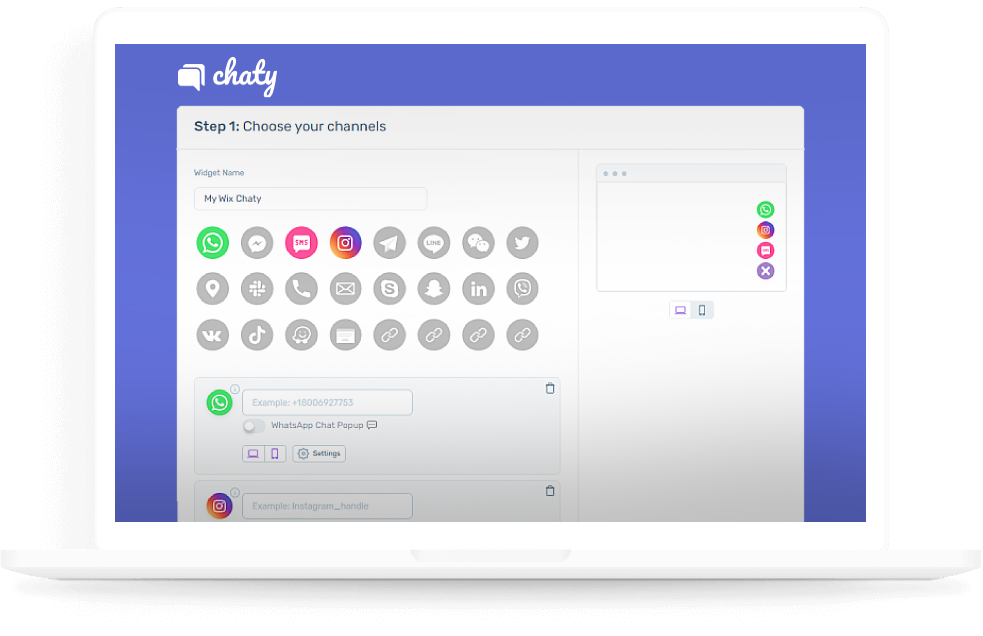
Chaty helps businesses give website visitors a single place to find the communication channels they prefer. You can add channels, customize the widget, use targeting rules, and guide visitors toward support, sales, contact forms, or other important destinations.
Register for Chaty for free and create a more convenient way for visitors to start a conversation with your business.

